Site Guide

Find your way around the Engineering Club.

Know what you need? Search for a component, concept or project.

Around the site

Start

Labs

TestingExperimental

Build

Club

LearnExperimental

Go a little deeper

Entry points to larger collections. Use Search for individual records.

Learning paths & reference

Inside PiCrawlerExperimental

Inside Inventory

← Club inventory
Arduino Uno-compatible board

Microcontrollers

Arduino Uno-compatible board

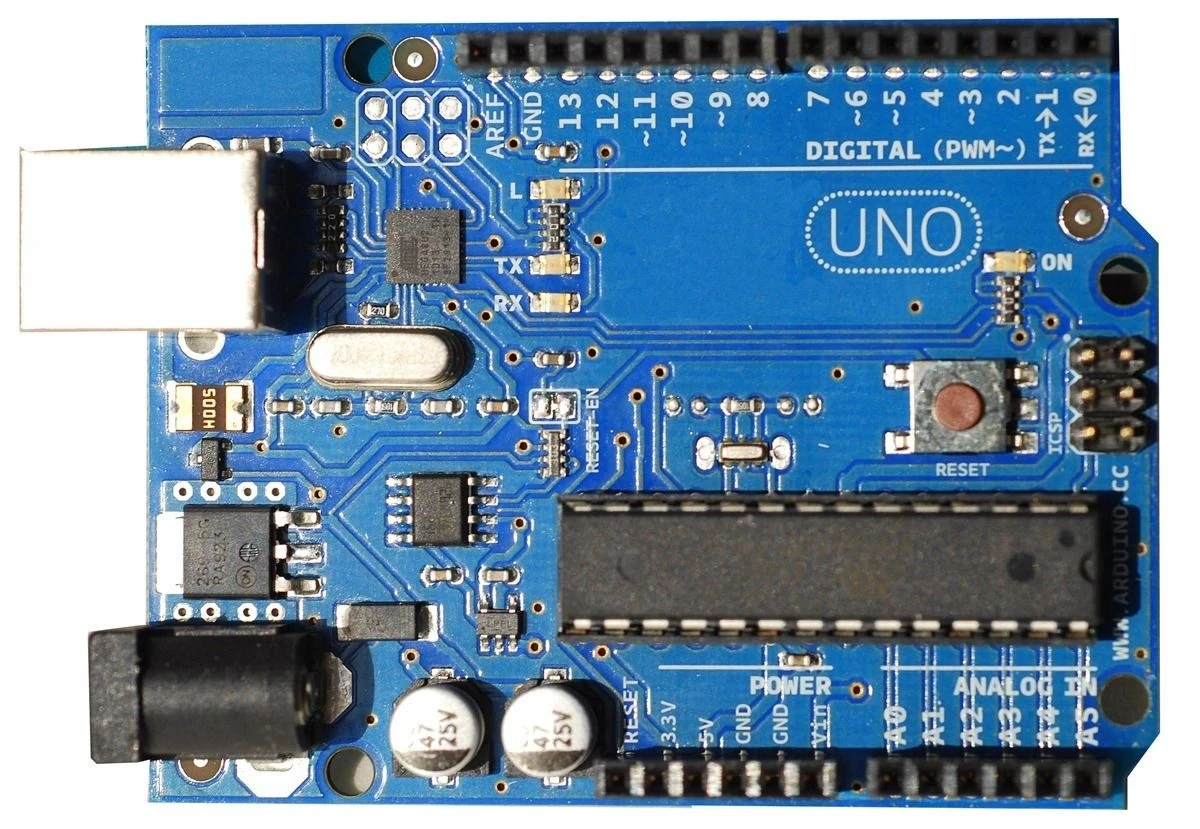
A generic Uno-compatible board targets Arduino-style beginner control, but the frozen record does not establish its manufacturer or exact processor/USB revision.

Owned by clubQuantity: 1

Intended Uno-format headers; verify revision

What it does

Provides the intended Uno-form-factor workflow for learning GPIO, analog sensing and uploaded sketches. Compatibility describes the intended platform; it is not proof that every circuit or chip matches an official Uno R3.

Useful specifications

Intended platform
Uno-compatible
MCU/logic/USB bridge
Not established for exact board
How it works

A typical AVR Uno-compatible board runs firmware from flash and connects to the host through a USB-to-serial bridge. Actual processor, bootloader and bridge markings determine programming settings; the outline alone cannot confirm them.

Recognize the part

UNO-format PCB with USB connector and familiar analog/digital header groups. Read the central MCU and USB interface IC markings; do not relabel it as a branded Arduino.

Also called: Uno clone, Uno-compatible board, UNO R3

How to use it

Inspect markings before selecting a board target or installing a USB driver. If an ATmega328P Uno design is confirmed, follow the Uno pinout and sketch workflow. Verify power/logic voltage, regulator labeling and header functions before connecting loads; use external drivers for motors.

Know before using

Limits

  • Compatibility and driver details vary by clone.
  • Exact memory and electrical ratings cannot be certified from the seller label.

Common mistakes

  • Installing a driver for the wrong USB bridge.
  • Copying Uno electrical ratings without checking the actual board.

Related owned hardware

Read the conditions before connecting parts. A relationship can involve a driver, controller or a redesigned circuit.

prototyping

830-point solderless breadboard

  • After MCU/power/bridge identification, the Uno-format board supports familiar low-current prototype layouts.

Connection conditions

  • Do not copy branded Uno electrical limits until exact circuitry is confirmed.

preconnection verification

AstroAI digital multimeter

  • Check identified regulator rails and actual logic voltage before adding modules.

Connection conditions

  • MCU/USB markings determine programming target and driver.

If you outgrow it

Researched external products, separate from club inventory. Price and availability are not promised.

Arduino

UNO R4 WiFi

Not owned by club

The Uno R3 has limited SRAM and no integrated radio; the Mega is useful for pin count but also lacks integrated networking.

What improves

  • Adds integrated Wi-Fi/Bluetooth connectivity and substantially more working memory than the AVR Uno R3.
  • RA4M1 Cortex-M4 runs at 48 MHz with 32 kB SRAM and 256 kB flash; 5 V GPIO, DAC and native USB HID enable different instrument tasks.

The Uno R3 has limited SRAM and no integrated radio; the Mega is useful for pin count but also lacks integrated networking. Choose this path only when the stated improvement is a requirement.

Tradeoffs

  • AVR-specific register code and libraries require porting.
  • Uno-format pin count does not replace Mega’s many I/O; radio integration has its own software and power constraints.

Additional hardware

  • Data-capable USB-C cable; verified shield/library and signal compatibility
Migration steps
  • Review the exact product documentation and chosen carrier before purchase.
  • Rework connections, firmware/library configuration, power and mechanics as required by this path.
  • Validate the new subsystem against the project measurement or timing requirement.

Official product / documentation ↗
Documentation

Inventory record and image evidence

Quantity: 1 · quantity confidence: high

Known countable purchase/BOM contributions. Each source line is a total; do not multiply by container count or add photo observations.

Ownership: source-backed club holding. Identity confidence: probable.

Supported by source contribution; unresolved variant and source details remain on its holding.

V1 generic compatible identity is preserved. Uno values are conditional reference-platform guidance, not asserted exact board specifications.

Source holdings

Parent kits

Original V3 image confidence: 82% · high. Physical club photograph supports the visible component class; full scene retained as evidence.

Original V3 image source: Engineering Club photographs (physical photo). Images describe identity and form; they do not establish quantity.

Displayed image source: User-supplied Arduino Uno-compatible board reference photograph.

User explicitly assigns this Uno-form board photo to the compatible-board entry. Exact owned manufacturer, processor and USB revision are not newly established.

User-supplied reference image; original rights retained.