Arduino Uno R3
required for programmed response
A controller interprets the event and controls any display, alarm or actuator.
- Read the switched contacts, not two internally common legs.
Discrete Components
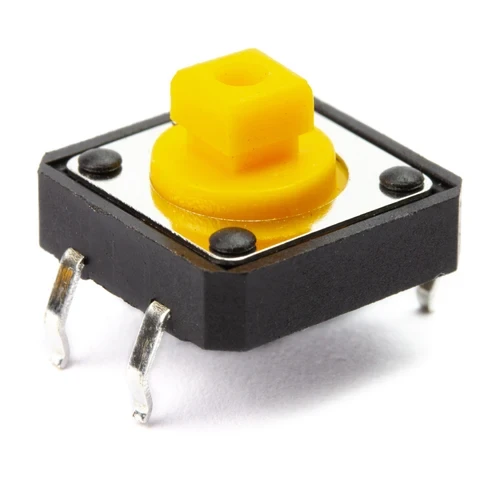
A large tactile pushbutton closes a momentary contact while pressed to request a digital action.
Contact/digital input
Provides a user-triggered event without retaining a mechanical on/off state. Input circuitry must define an idle voltage and software should treat contact bounce as one press.
Pressing flexes a metal contact dome or mechanism until two electrical nodes touch. Rebound causes brief repeated openings/closures. Four legs commonly represent two internally joined pairs, not four independent switch poles.
Larger square tactile switch with a cap-compatible actuator. Confirm paired contacts by continuity; the switch may bridge two legs even before pressing.
Also called: big push button
Connect a verified contact pair between input and ground with a pull-up, or use an appropriate pull-down topology. Debounce the signal, detect the chosen press/release edge and avoid wiring already-common contacts as if they were switched.
required for programmed response
A controller interprets the event and controls any display, alarm or actuator.
required if no internal pullup
A pull-up/down prevents a disconnected contact from leaving the input floating.
beginner
Implement timed red/yellow/green states with a button request and a safe startup state.
intermediate
Move between measured output angles with acceleration limits and a documented home reference.
Read the conditions before connecting parts. A relationship can involve a driver, controller or a redesigned circuit.
event input
event input
event indication
support hardware
Quantity: 4 · quantity confidence: high
Known countable purchase/BOM contributions. Each source line is a total; do not multiply by container count or add photo observations.
Ownership: source-backed club holding. Identity confidence: high.
Identity follows exact kit sheet/BOM; expected quantity is not a physical stocktake.
V1 establishes the catalog identity. Technical references explain the named device or component class; unverified carrier-specific ratings and pinouts are not asserted.
Original V3 image confidence: 90% · high. Component crop tied to an owned kit and its source mapping; selected by form rather than filename alone.
Original V3 image source: Freenove FNK0020 older sheet (owned kit reference). Images describe identity and form; they do not establish quantity.
Displayed image source: User-supplied Large tactile pushbutton reference photograph.
User-selected large tactile pushbutton reference; actuator, body and visible terminals retained. Mechanical fit and electrical behavior require source and physical checks.
User-supplied reference image; original rights retained.