What you need
- A Raspberry Pi Pico 2 W with RP2350, plus a Micro-USB data cable.
- VS Code and the official Raspberry Pi Pico extension in a separate VS Code profile from PlatformIO.
- Pico SDK 2.3.1 and its Arm compiler, CMake and Ninja tools. The extension manages installation; no external circuit or Wi-Fi connection is needed.
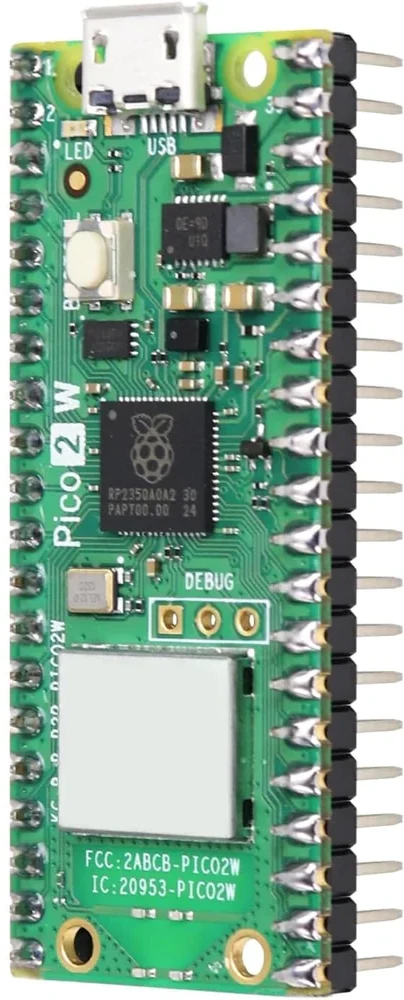
Use the Pico 2 W target, pico2_w. This project is not a PlatformIO project and cannot use the original Pico's firmware. GPIO uses 3.3 V; leave the headers disconnected for this first run.
Setup
Install the official Pico extension
Install VS Code and Raspberry Pi Pico by Raspberry Pi from Extensions. The reviewed package uses extension 0.23.0 with VS Code 1.105.1 or newer. Let its managed tools finish installing before importing the project.
Your first program
The program blinks the wireless chip's onboard LED and sends a USB serial heartbeat, without joining a Wi-Fi network.
#include <cstdio>
#include "pico/stdlib.h"
#include "pico/cyw43_arch.h"

#ifndef RASPBERRYPI_PICO2_W
#error "Configure the SDK for Pico 2 W, not Pico or Pico W."
#endif

int main() {
  stdio_init_all();
  if (cyw43_arch_init() != 0) {
    while (true) {
      std::puts("CYW43 initialization failed: LED is not running");
      sleep_ms(1000);
    }
  }
  while (true) {
    cyw43_arch_gpio_put(CYW43_WL_GPIO_LED_PIN, true);
    sleep_ms(500);
    cyw43_arch_gpio_put(CYW43_WL_GPIO_LED_PIN, false);
    sleep_ms(500);
    std::puts("Engineering Club: Pico 2 W heartbeat");
  }
}
CMakeLists.txt
cmake_minimum_required(VERSION 3.13)

# Keep this board contract before SDK import and project/toolchain selection.
set(PICO_BOARD pico2_w CACHE STRING "Exact Pico 2 W target")
if(NOT PICO_BOARD STREQUAL "pico2_w")
  message(FATAL_ERROR "This workspace requires PICO_BOARD=pico2_w")
endif()
set(PICO_PLATFORM rp2350-arm-s CACHE STRING "Arm Cortex-M33 platform")
if(NOT PICO_PLATFORM STREQUAL "rp2350-arm-s")
  message(FATAL_ERROR "This workspace selects the Arm Cortex-M33 platform")
endif()
if(NOT PICO_SDK_PATH AND DEFINED ENV{PICO_SDK_PATH})
  set(PICO_SDK_PATH "$ENV{PICO_SDK_PATH}")
endif()
if(NOT PICO_SDK_PATH)
  message(FATAL_ERROR "Set PICO_SDK_PATH to the installed Pico SDK 2.3.1 directory")
endif()
if(NOT EXISTS "${PICO_SDK_PATH}/external/pico_sdk_import.cmake")
  message(FATAL_ERROR "PICO_SDK_PATH does not contain a complete Pico SDK")
endif()
include("${PICO_SDK_PATH}/external/pico_sdk_import.cmake")
project(club_pico2w_first LANGUAGES C CXX ASM)
set(CMAKE_C_STANDARD 11)
set(CMAKE_CXX_STANDARD 17)
pico_sdk_init()
if(NOT PICO_SDK_VERSION_STRING VERSION_EQUAL "2.3.1")
  message(FATAL_ERROR "Reviewed SDK baseline is 2.3.1; review before changing it")
endif()
add_executable(club_pico2w_first src/main.cpp)
target_link_libraries(club_pico2w_first pico_stdlib pico_cyw43_arch_none)
pico_enable_stdio_usb(club_pico2w_first 1)
pico_enable_stdio_uart(club_pico2w_first 0)
pico_add_extra_outputs(club_pico2w_first)
Download and import
Extract the complete project ZIP. In the Pico extension, choose Import Pico Project and select the folder containing
CMakeLists.txtandsrc. Choose Pico 2 W, SDK 2.3.1, and the Arm toolchain (reviewed selection:15_2_Rel1). Do not create a new example over these files.Compile the project
Choose Compile Pico Project. Wait for a successful build and locate
build/club_pico2w_first.uf2. The supplied CMake file checksPICO_BOARD=pico2_w,PICO_PLATFORM=rp2350-arm-s, and SDK 2.3.1. If import creates local editor or CMake settings, keep those target and SDK choices intact.Copy the UF2
Disconnect USB. Hold BOOTSEL while reconnecting, then release it when the RP2350 boot drive appears. Copy your newly built
club_pico2w_first.uf2to that drive. It should disappear as the board reboots. This replaces previous firmware; the download contains source, not a prebuilt UF2.
Build from a terminal instead
Install the complete official SDK 2.3.1 including submodules, plus CMake, Ninja and an Arm compiler. Set PICO_SDK_PATH to that installed SDK directory and ensure the tools are on this terminal's PATH. From the extracted project folder, run:
cmake -S . -B build -G Ninja -DPICO_BOARD=pico2_w -DPICO_PLATFORM=rp2350-arm-s
cmake --build build
Verify it works
The onboard LED should alternate on and off every half-second. In a serial terminal, select the application's USB serial port after reboot and use 115200 baud. Expect the heartbeat below about once a second. The LED is controlled through CYW43, not original Pico GPIO 25.
Engineering Club: Pico 2 W heartbeatTroubleshooting
- SDK or compiler cannot be found
Finish the Pico extension's managed setup and compile there. For terminal builds, check PICO_SDK_PATH and the CMake, Ninja and Arm compiler PATH entries; a normal terminal may not inherit extension-managed tools.
- CMake rejects the target or SDK
Select pico2_w, rp2350-arm-s and SDK 2.3.1. Reconfigure in a fresh build folder after correcting a wrong target; do not remove the supplied guards.
- No RP2350 boot drive
Try a data-capable cable and hold BOOTSEL before plugging in. Confirm this is Pico 2 W, not the RP2040 Pico.
- CYW43 initialization failed
Check the board selection and use the supplied source and CMake file. The LED needs CYW43 initialization even without Wi-Fi. Do not change it to GPIO 25.