Site Guide

Find your way around the Engineering Club.

Know what you need? Search for a component, concept or project.

Around the site

Start

Labs

TestingExperimental

Build

Club

LearnExperimental

Go a little deeper

Entry points to larger collections. Use Search for individual records.

Learning paths & reference

Inside PiCrawlerExperimental

Inside Inventory

← Club inventory
Raspberry Pi Pico 2 W

Microcontrollers

Raspberry Pi Pico 2 W

Pico 2 W is an RP2350-based 3.3 V microcontroller board with Wi-Fi/Bluetooth, larger memory and programmable I/O for networked control.

Owned by clubQuantity: 1

USB · GPIO · Wi-Fi · Micro-USB programming/USB device-host support · 3.3 V GPIO; ADC; PWM · I²C; SPI; UART; PIO; SWD · Wi-Fi; Bluetooth/BLE

What it does

Runs a flashed program or MicroPython interpreter that directly reads sensors and controls pins. It does not boot Raspberry Pi OS, accept a desktop application or need a microSD card. The radio adds telemetry and remote interaction while the newer MCU provides more SRAM and flash for larger firmware. It is useful for connected instruments and custom timing interfaces, with radio tasks still competing for resources.

Useful specifications

Processor
RP2350: dual Cortex-M33 or dual Hazard3 RISC-V, up to 150 MHz
SRAM/flash
520 KB / 4 MB
Exposed GPIO
26 multifunction pins
ADC
3 exposed 12-bit inputs
PWM
16 routable channels on this RP2350A board; paired outputs share a slice timer
PIO state machines
12
Buses
2 SPI, 2 I²C, 2 UART; USB 1.1
GPIO logic
3.3 V
Radio
2.4 GHz 802.11n Wi-Fi; Bluetooth 5.2
VSYS supply input
1.8–5.5 V; USB VBUS is a separate nominal 5 V input
How it works

RP2350 offers a choice of Arm Cortex-M33 or Hazard3 RISC-V processor cores; it does not run all four as a four-core processor. Firmware chooses its execution architecture. CPU code works alongside peripheral engines, DMA and PIO state machines; onboard serial flash stores code, while SRAM holds active data. A separate radio device handles Wi-Fi/Bluetooth communications under software control.

Recognize the part

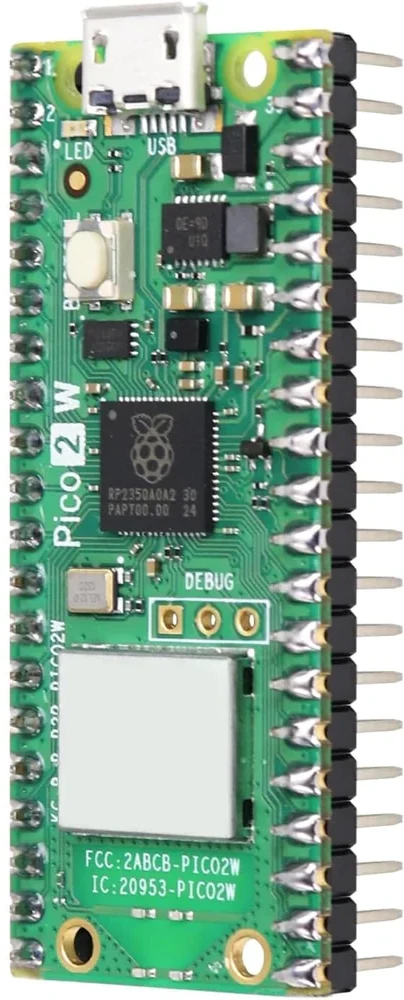
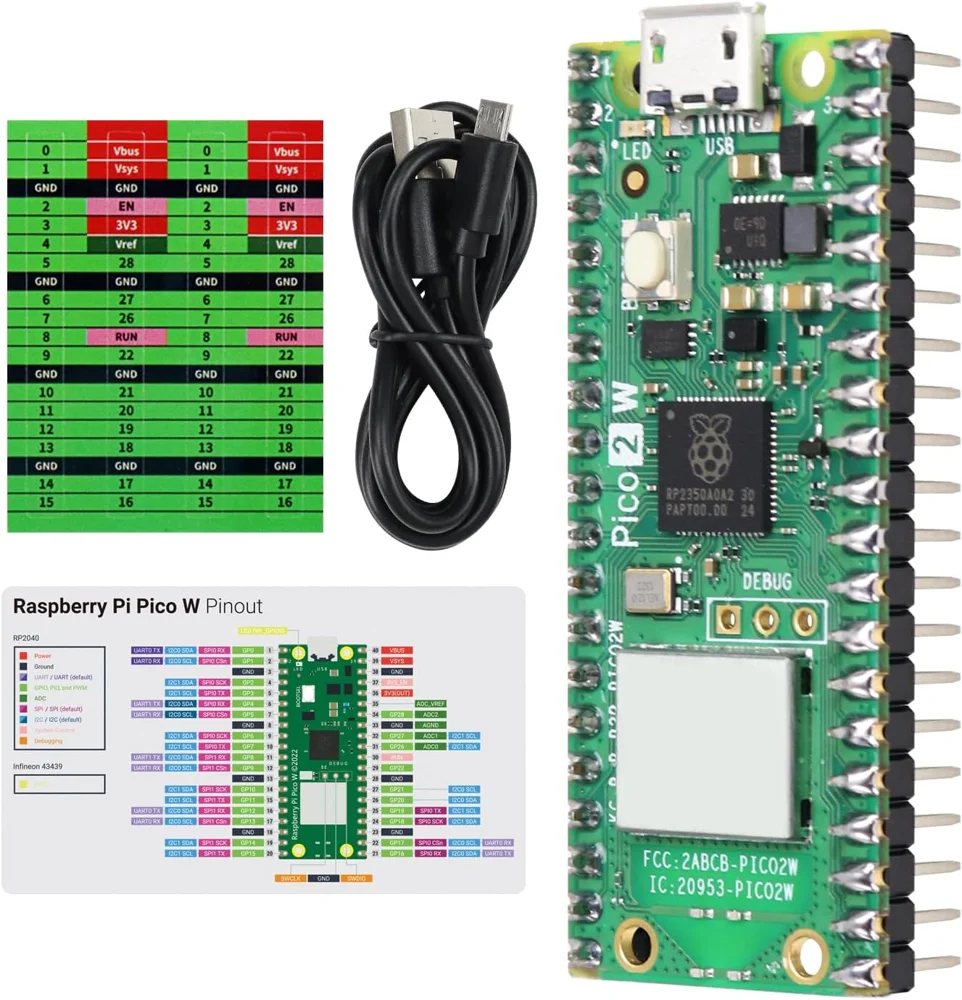
Narrow Pico-family PCB with wireless antenna area; identify Pico 2 W from the printed board name rather than its outline. Physical GPIO labels are GP numbers, not the same as header-position numbers. Read the board name before choosing firmware.

Also called: Pico 2 W

How to use it

For MicroPython, hold BOOTSEL while connecting a data-capable micro-USB cable, then copy the UF2 built for this exact board and use a supported serial REPL/IDE. C/C++ uses Raspberry Pi’s Pico SDK and an appropriate board target. Supply via USB VBUS or the documented VSYS route, and use only 3.3 V-compatible GPIO/ADC signals. The 3V3 pin is a regulated rail, not a place for a 5 V supply. Select legal pin functions for I²C/SPI/UART and share ground with externally powered drivers. Use Pico 2 W firmware and radio libraries; older RP2040 UF2 files are not the correct build. Keep the antenna region clear and account for wireless activity when timing the main program.

Know before using

Limits

  • No Linux, removable OS storage or desktop software.
  • ADC noise/reference behavior limits measurement accuracy.
  • GPIO cannot supply motor/servo current.
  • Radio and firmware version affect timing and available memory.
  • RP2350 architecture choice adds toolchain/firmware compatibility requirements.

Common mistakes

  • Putting 5 V signals into GPIO or ADC.
  • Confusing a physical header position with a GP label.
  • Copying a UF2 built for a different chip/board.
  • Assuming a PWM duty cycle produces a true DAC output.

Care and safety

  • Use 3.3 V GPIO-compatible signals; verify and level-shift 5 V module outputs before connecting them.
  • Verify power pins and level-shift 5 V peripheral outputs.

What can I build?

intermediate

Slow wireless four-color status label

Needs additional hardware

Display a manually supplied or locally served status on the exact Waveshare (G) panel with a slow refresh schedule.

Related owned hardware

Read the conditions before connecting parts. A relationship can involve a driver, controller or a redesigned circuit.

wireless controller

HC-SR04 ultrasonic distance sensor module

  • Pico 2 W can time range pulses and publish measurements over Wi-Fi.
  • The ranging module provides distance telemetry to a networked Pico 2 W application.

Connection conditions

  • Verify actual output/pull-up voltage before connecting to 3.3 V GPIO; use suitable level translation where required.
  • Reduce the usual 5 V Echo to a GPIO-safe voltage; Trigger recognition must also be checked.

wireless controller

DHT11 temperature and humidity sensor, bare part

  • Pico 2 W can publish slow humidity readings without leaving a computer connected.

Connection conditions

  • Verify actual output/pull-up voltage before connecting to 3.3 V GPIO; use suitable level translation where required.
  • Use a library that explicitly supports DHT11, not DHT22 settings.

wireless controller · wireless environment

DHT11 humidity-temperature module

  • Pico 2 W can publish slow humidity readings without leaving a computer connected.
  • Pico 2 W can send slow humidity/temperature readings while tracking invalid/stale DHT11 messages.

Connection conditions

  • Verify actual output/pull-up voltage before connecting to 3.3 V GPIO; use suitable level translation where required.
  • Use a library that explicitly supports DHT11, not DHT22 settings.
  • Use exact Pico 2 W firmware and a supported DHT11 decoder; verify data pull-up and valid supply.

spi display

Waveshare 3.5-inch e-Paper (G) with driver board

  • Pico 2 W can retrieve a status update and refresh a persistent four-color label.
  • Waveshare 3.5-inch e-Paper (G) with driver board supplies the output surface for a Raspberry Pi Pico 2 W application.

Connection conditions

  • Use exact (G) waveform/driver, SPI/control pins and BUSY completion; no partial-refresh claim.

programming cable

USB-A to micro-USB cable

  • Pico 2 W uses micro-USB for BOOTSEL flashing and serial interaction.

Connection conditions

  • Use exact-board firmware; cable form is not a firmware compatibility guarantee.

prototyping

830-point solderless breadboard

  • Build accessible low-current peripheral wiring before committing to soldered construction.

Connection conditions

  • Separate voltage domains and identify ground/power strips.

debugging

AstroAI digital multimeter

  • Measure supply/input voltage to distinguish wiring faults from software faults.

Connection conditions

  • Use safe voltage/continuity modes; GPIO current limits still apply.

When would I use each?

Microcontrollers

Architecture choice for a host role; MCU and Linux SBC execution, power and analog/timing requirements differ.

Begin with required software/timing and signal voltage. Choose Uno for a small 5 V sketch, Mega for pin/UART count, ESP32 for embedded networking, and Pico for PIO-style timing. Pico 2 W adds networking to a newer MCU. Pi 4/5 are Linux computers; use an external ADC or MCU helper for analog inputs and deterministic timing. More CPU speed does not remove driver, power or voltage requirements.

Pico Boards

Related Pico host roles after firmware/resource/radio review.

Use the standard Pico for straightforward offline control and timing work. Choose Pico 2 W for networking or larger firmware memory. Similar headers do not make binaries or peripheral resource assumptions interchangeable.

Owned substitutions

Raspberry Pi Pico

partial redesign

The owned alternative can perform the same broad host role when its capacity and required peripheral support are sufficient.

Required changes

  • Select the exact board target/OS and matching libraries.
  • Recheck physical pin mapping, power and timer/bus allocation.
  • Do not transfer compiled firmware blindly.
  • A smaller/no-radio alternative cannot preserve unavailable memory, pins, performance or wireless features.

If you outgrow it

Researched external products, separate from club inventory. Price and availability are not promised.

STMicroelectronics

NUCLEO-G474RE

Not owned by club

The project needs STM32-specific analog/control peripherals rather than simply more GPIO or an existing radio.

What improves

  • Adds an STM32G474RE platform for advanced timer and analog-control work.
  • Cortex-M4 operation up to 170 MHz provides a different control/peripheral architecture.

The project needs STM32-specific analog/control peripherals rather than simply more GPIO or an existing radio. Choose this path only when the stated improvement is a requirement.

Tradeoffs

  • Requires an STM32 toolchain and peripheral/library port.
  • No integrated Wi-Fi; clock rate alone does not improve a complete design or replace Pico PIO.

Additional hardware

  • Board-compatible USB cable/headers and circuit adaptation; external radio if networking is required
Migration steps
  • Review the exact product documentation and chosen carrier before purchase.
  • Rework connections, firmware/library configuration, power and mechanics as required by this path.
  • Validate the new subsystem against the project measurement or timing requirement.

Official product / documentation ↗

Documentation

Keep learning

Learn the principle

Wishlist / acquisition context

Freenove Raspberry Pi Pico 2 W with headers: 1 individual units · received

View wishlist →
Inventory record and image evidence

Quantity: 1 · quantity confidence: confirmed

Known countable purchase/BOM contributions. Each source line is a total; do not multiply by container count or add photo observations.

Ownership: source-backed club holding. Identity confidence: confirmed.

User explicitly confirms ownership; exact supplied product image visibly reads Pico 2 W and RP2350.

Frozen quantities are preserved separately: Pico 2 units and Pico 2 W 1 unit. Official current board-family documentation supplies numerical platform specifications; no Pico W inventory record is created.

Source holdings

Image confidence: 99% · confirmed. Visible Pico 2 W / RP2350 / PICO2W marks establish the image identity; original filename and inset pinout were wrong.

Image source: User-confirmed exact Pico 2 W product image (exact product). Images describe identity and form; they do not establish quantity.