mechanical pairing
Small tactile pushbutton
- A matching cap makes a tactile control easier to operate and identify by color.
Connection conditions
- Verify stem fit and unobstructed travel; cap color does not establish a circuit function.
Prototyping
Plastic caps enlarge compatible pushbutton actuators and distinguish controls by color. The electrical switch is a separate component.
Improves finger contact and visual distinction between controls. It is an accessory; the electrical switch beneath it determines momentary/maintained behavior.
The molded cap fits over a compatible stem and transmits finger force to the switch mechanism. It contains no sensing or electrical contacts.
Molded insulating plastic.
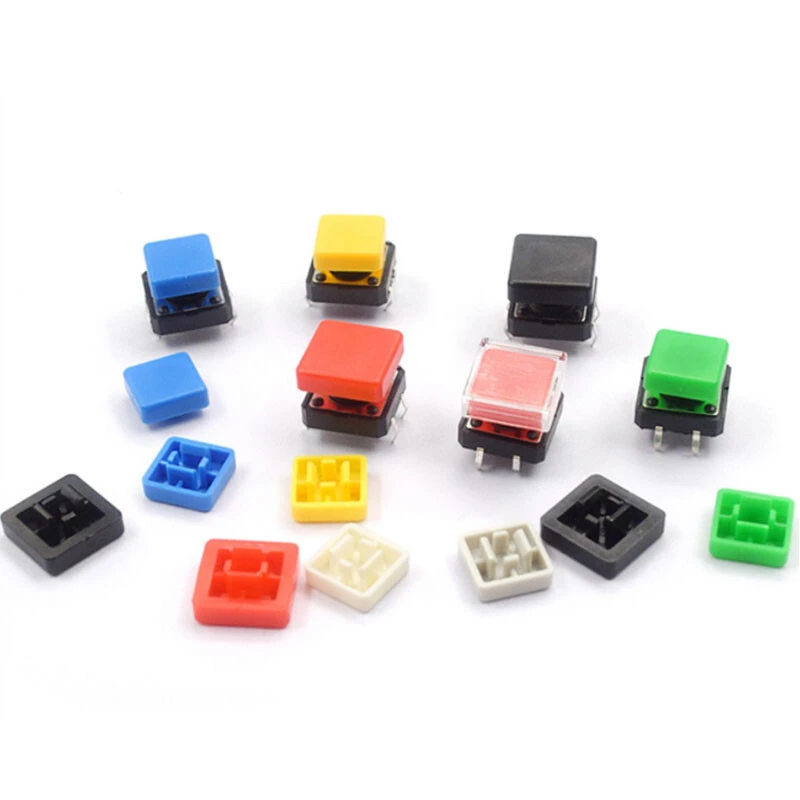
Square plastic caps with a socket or recess underneath. Match the recess to the switch stem; the reference photo also shows mounted switches to illustrate fit.
Also called: push button caps, button caps, Blue pushbutton cap, blue push button cap, Green pushbutton cap, green push button cap, Red pushbutton cap, red push button cap, Yellow pushbutton cap, Yellow Button Cap, yellow push button cap
Match stem shape/size, press gently and verify unobstructed switch travel. Use color consistently for the intended control function.
Read the conditions before connecting parts. A relationship can involve a driver, controller or a redesigned circuit.
mechanical pairing
parts organization
Quantity: 8 · quantity confidence: high
Combined existing source totals: blue 1; green 1; red 1; yellow 5. Kit quantities are not multiplied or added again; physical stock is unverified.
Ownership: source-backed club holding. Identity confidence: high.
Identity follows exact kit sheet/BOM; expected quantity is not a physical stocktake.
V1 establishes the catalog identity. Technical references explain the named device or component class; unverified carrier-specific ratings and pinouts are not asserted.
Original V3 image confidence: 90% · high. User-selected cap class reference. Mounted switches illustrate fit; exact owned variants and compatibility are not newly established.
Original V3 image source: User-supplied pushbutton cap reference photograph; mounted switches illustrate mechanical fit and are separate components. (user supplied reference). Images describe identity and form; they do not establish quantity.
Displayed image source: User-supplied pushbutton cap reference photograph; mounted switches illustrate mechanical fit and are separate components.
User requested one combined pushbutton caps inventory entry using this photograph. The pictured colors, caps and mounted switches do not establish stock quantities or universal mechanical compatibility.
User-supplied reference image; original rights retained.
