ELEGOO MEGA · LESSON 8
Tilt Ball Switch
Turn the onboard L LED on when the tilt switch closes.
Read a mechanical contact using INPUT_PULLUP.
Parts List
- ELEGOO Mega 2560 R3 is a 5 V ATmega2560 AVR board with many I/O pins and four hardware UARTs for control systems with several peripherals. Long ELEGOO-branded Mega PCB with USB-B and barrel connector, ATmega2560 marking, extended side headers and a large double-row digital header at the end. Read printed Mega labels; its SPI hardware placement is not the same numeric pins as an Uno.
- A USB-A to USB-B cable carries USB power and, when its data conductors are present, a host/device data link. USB-A plug and square USB-B plug. Inspect the plug shape; micro-USB is not USB-C, and USB-B is the squarer device connector.
- A contact sensor turns orientation into switch events for a controller. Small two-lead cylindrical switch; verify mechanism before handling. Check actual switch element and carrier labels before selecting a pinout.
- Male-to-female jumper leads make removable point-to-point connections for low-current prototype signals. Pin at one end and socket at the other. Check intact insulation and snug contacts before use.
Assembly
- Unplug USB and connect the bare two-lead switch; it is not the three-pin sensor module.
- Reconnect USB and gently change its angle.
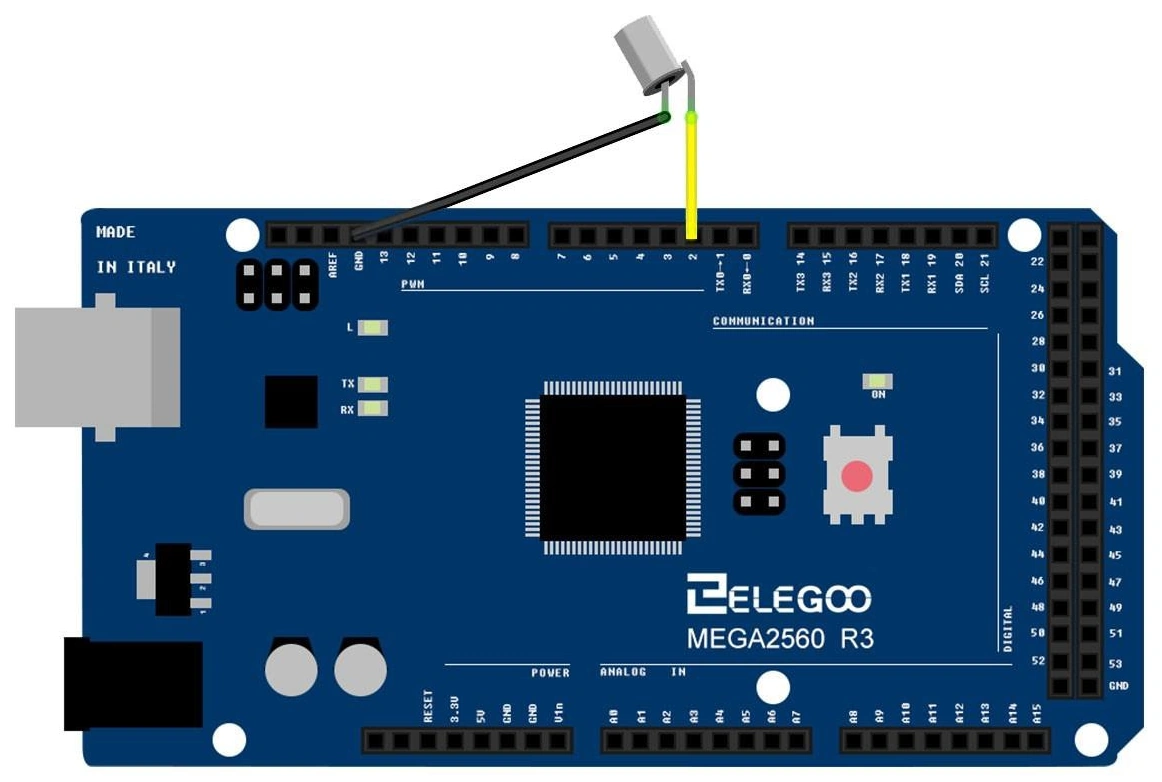
Reviewed pin-to-pin connections
| From | To | Purpose / notes |
|---|---|---|
| Mega: D2 | Tilt switch: contact1 | |
| Tilt switch: contact2 | Mega: GND |
Code
PlatformIO configuration
[env:mega]
platform = atmelavr@5.3.0
board = megaatmega2560
framework = arduino
monitor_speed = 9600
#include <Arduino.h>

// Use digital pin 2 to read the switch.
const uint8_t SWITCH_PIN = 2;

// Set up the built-in LED and enable the switch input pull-up.
void setup() {
  pinMode(LED_BUILTIN, OUTPUT);
  // The internal pull-up means an open switch reads HIGH and a closed-to-ground switch reads LOW.
  pinMode(SWITCH_PIN, INPUT_PULLUP);
}

// This one line reads the switch and updates the LED immediately.
void loop() {
  // ?: is a compact if/else: when the switch reads LOW, output HIGH; otherwise output LOW.
  digitalWrite(LED_BUILTIN, digitalRead(SWITCH_PIN) == LOW ? HIGH : LOW);
}
Expected behavior
The L LED is on while the switch contacts are closed and off while open; tilt direction depends on the actual switch.
Experiments & Challenges
- Invert the LED condition so open contacts turn it on.
Troubleshooting
- LED does not change: check the two-lead switch at both orientations and confirm D2, not D20.