ELEGOO MEGA · LESSON 11
Membrane Switch Module
Print each key pressed on a 4x4 membrane keypad.
Scan a row-and-column key matrix.
Parts List
- ELEGOO Mega 2560 R3 is a 5 V ATmega2560 AVR board with many I/O pins and four hardware UARTs for control systems with several peripherals. Long ELEGOO-branded Mega PCB with USB-B and barrel connector, ATmega2560 marking, extended side headers and a large double-row digital header at the end. Read printed Mega labels; its SPI hardware placement is not the same numeric pins as an Uno.
- A USB-A to USB-B cable carries USB power and, when its data conductors are present, a host/device data link. USB-A plug and square USB-B plug. Inspect the plug shape; micro-USB is not USB-C, and USB-B is the squarer device connector.
- A 4×4 membrane keypad scans sixteen buttons through four row wires and four column wires. Flexible sixteen-key pad with an eight-conductor tail. Header order is model-dependent.
- Male-to-male jumper leads make removable point-to-point connections for low-current prototype signals. Pins at both ends; count individual leads rather than ribbon groups. Check intact insulation and snug contacts before use.
Assembly
- Unplug USB; hold the keys face-up with the tail pointing down.
- Connect the manual’s tail contacts 1–8 left-to-right to D9–D2; do not connect the tail to 5 V or GND.
- Reconnect USB and check keys 1, A, * and D before using the whole matrix.
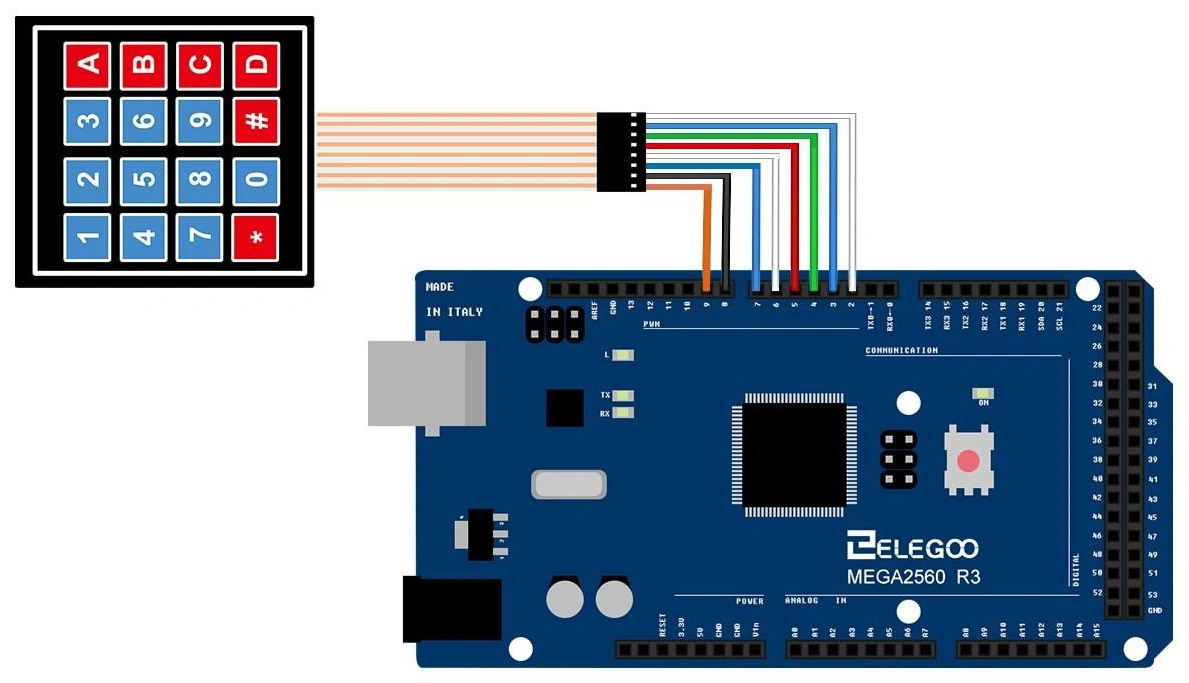
Reviewed pin-to-pin connections
| From | To | Purpose / notes |
|---|---|---|
| Mega: D9 | Keypad: contact1 / R1 | |
| Mega: D8 | Keypad: contact2 / R2 | |
| Mega: D7 | Keypad: contact3 / R3 | |
| Mega: D6 | Keypad: contact4 / R4 | |
| Mega: D5 | Keypad: contact5 / C1 | |
| Mega: D4 | Keypad: contact6 / C2 | |
| Mega: D3 | Keypad: contact7 / C3 | |
| Mega: D2 | Keypad: contact8 / C4 |
Code
Download complete PlatformIO project
ZIP includes platformio.ini, src/main.cpp, and bundled libraries (Keypad).
Extract the ZIP, then open its workspaces/lesson-11 folder in VS Code. Keep the adjacent third-party folder in place.
PlatformIO configuration
[env:mega]
platform = atmelavr@5.3.0
board = megaatmega2560
framework = arduino
monitor_speed = 9600
lib_deps =
  file://../../third-party/Keypad
Open PlatformIO Monitor at 9600 baud after Upload. Close Monitor before another Upload if the port is busy.
#include <Arduino.h>
// Keypad.h reads a matrix keypad without manually scanning every row and column.
#include <Keypad.h>

// The keypad has four rows and four columns; byte is an 8-bit unsigned type.
const byte ROWS = 4;
const byte COLS = 4;
// This two-dimensional array maps each row/column pair to the printed key label.
char keys[ROWS][COLS] = {
  {'1', '2', '3', 'A'},
  {'4', '5', '6', 'B'},
  {'7', '8', '9', 'C'},
  {'*', '0', '#', 'D'}
};
// These are the four Mega pins connected to the keypad row wires.
byte rowPins[ROWS] = {9, 8, 7, 6};
// These four pins connect to the column wires.
byte colPins[COLS] = {5, 4, 3, 2};
// Create a keypad object using the key map and those eight pin assignments.
Keypad keypad(makeKeymap(keys), rowPins, colPins, ROWS, COLS);

// Start Serial Monitor so each detected key can be shown on the computer.
void setup() {
  Serial.begin(9600);
}

void loop() {
  // getKey() returns the pressed key character, or no key when nothing new is detected.
  const char key = keypad.getKey();
  // Only print when a key value exists; avoid filling Serial with empty readings.
  if (key) Serial.println(key);
}
Expected behavior
Each pressed key prints its0–9,A–D,* or# label at 9600 baud.
Experiments & Challenges
- Change one character in keys[][] and observe that key.
Troubleshooting
- Wrong labels with reliable presses: verify the tail orientation and row/column order before changing the key map.