ELEGOO MEGA · LESSON 12
DHT11 Temperature and Humidity Sensor
Print temperature and relative humidity from a DHT11 module.
Poll a non-blocking sensor driver without delaying its state machine.
Parts List
- ELEGOO Mega 2560 R3 is a 5 V ATmega2560 AVR board with many I/O pins and four hardware UARTs for control systems with several peripherals. Long ELEGOO-branded Mega PCB with USB-B and barrel connector, ATmega2560 marking, extended side headers and a large double-row digital header at the end. Read printed Mega labels; its SPI hardware placement is not the same numeric pins as an Uno.
- A USB-A to USB-B cable carries USB power and, when its data conductors are present, a host/device data link. USB-A plug and square USB-B plug. Inspect the plug shape; micro-USB is not USB-C, and USB-B is the squarer device connector.
- DHT11 reports air temperature and relative humidity over a timing-sensitive single-data-wire protocol; it suits coarse indoor monitoring. Blue vented DHT11 on a small PCB with power, ground and data header; the carrier may include a pull-up resistor.
- Male-to-female jumper leads make removable point-to-point connections for low-current prototype signals. Pin at one end and socket at the other. Check intact insulation and snug contacts before use.
Assembly
- Disconnect USB and confirm the three-pin module includes its DATA pull-up; a bare four-pin sensor is a different assembly.
- Connect by VCC/DATA/GND labels, not by an assumed physical pin order.
- Reconnect and wait several seconds for the first valid reading.
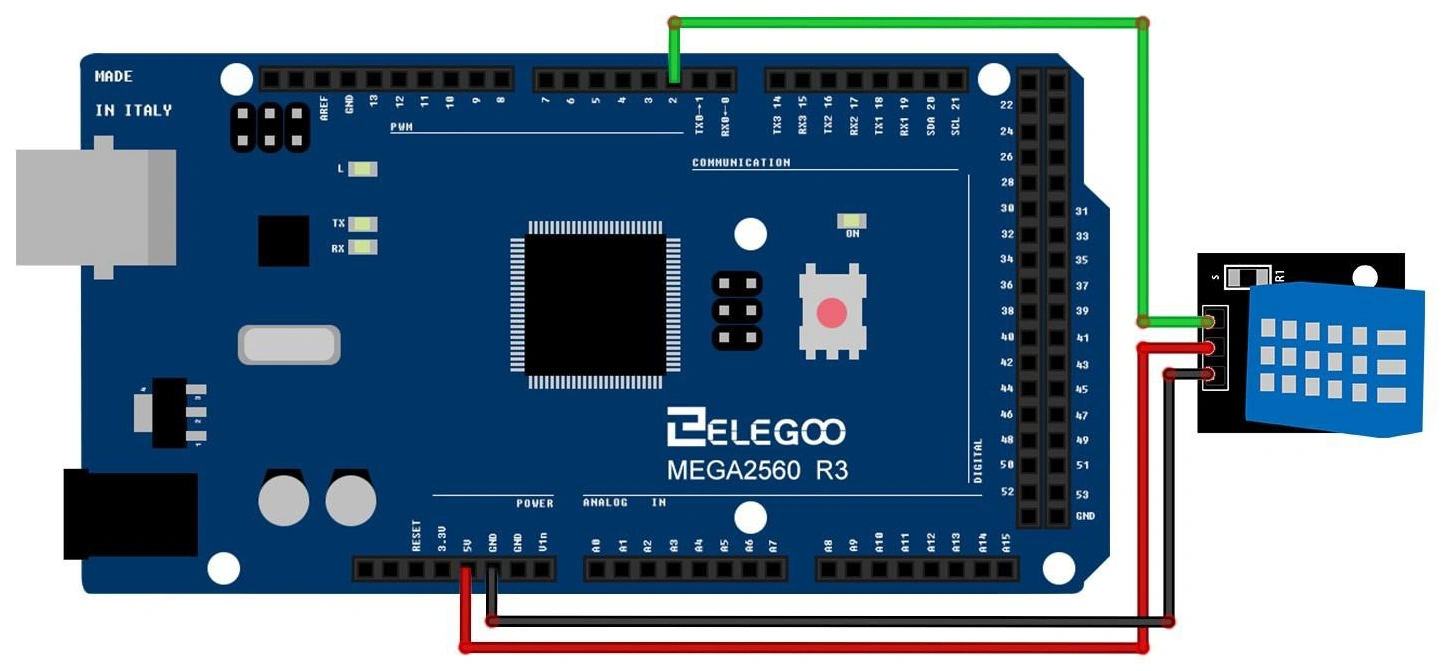
Reviewed pin-to-pin connections
| From | To | Purpose / notes |
|---|---|---|
| Mega: 5V | DHT11 module: VCC / + | |
| Mega: GND | DHT11 module: GND / - | |
| Mega: D2 / DATA | DHT11 module: DATA / S |
Code
Download complete PlatformIO project
ZIP includes platformio.ini, src/main.cpp, and bundled libraries (DHT).
Extract the ZIP, then open its workspaces/lesson-12 folder in VS Code. Keep the adjacent third-party folder in place.
PlatformIO configuration
[env:mega]
platform = atmelavr@5.3.0
board = megaatmega2560
framework = arduino
monitor_speed = 9600
lib_deps =
  file://../../third-party/DHT
Open PlatformIO Monitor at 9600 baud after Upload. Close Monitor before another Upload if the port is busy.
// SPDX-License-Identifier: GPL-3.0-or-later
#include <Arduino.h>
// The DHT library reads temperature and humidity without a long delay() in loop().
#include <dht_nonblocking.h>

// Create a DHT11 sensor object; its signal wire uses Mega digital pin 2.
DHT_nonblocking sensor(2, DHT_TYPE_11);
// Remember the time of the last successful reading using millis().
unsigned long lastMeasurement = 0;

// Start the Serial Monitor at 9600 baud.
void setup() {
  Serial.begin(9600);
}

void loop() {
  // float variables can store measurements with decimal places.
  float temperature;
  float humidity;
  // Only report after at least 3 seconds and when the sensor has a completed reading.
  if (millis() - lastMeasurement > 3000UL && sensor.measure(&temperature, &humidity)) {
    // Save this time so the next successful report is spaced out.
    lastMeasurement = millis();
    Serial.print("T = ");
    // Print temperature with one digit after the decimal point.
    Serial.print(temperature, 1);
    Serial.print(" deg. C, H = ");
    Serial.print(humidity, 1);
    // println() prints text and starts a new line.
    Serial.println("%");
  }
}
Expected behavior
After the initial polling interval,9600-baud output reports T in°C and relative humidity in%; successful samples recur roughly every 3 s plus sensor timing.
Experiments & Challenges
- Change the 3000 ms sampling threshold to 5000 ms; leave loop() free to keep polling.
Troubleshooting
- No readings after several seconds: verify DATA=D2, module power/pull-up and the selected DHT_nonblocking dependency; Adafruit’s DHT API is not a drop-in replacement.