ELEGOO MEGA · LESSON 18
Water Level Detection Sensor Module
Print changing conductivity-sensor readings in Serial Monitor.
Read an analog voltage and report only changes larger than ten ADC counts.
Parts List
- ELEGOO Mega 2560 R3 is a 5 V ATmega2560 AVR board with many I/O pins and four hardware UARTs for control systems with several peripherals. Long ELEGOO-branded Mega PCB with USB-B and barrel connector, ATmega2560 marking, extended side headers and a large double-row digital header at the end. Read printed Mega labels; its SPI hardware placement is not the same numeric pins as an Uno.
- A USB-A to USB-B cable carries USB power and, when its data conductors are present, a host/device data link. USB-A plug and square USB-B plug. Inspect the plug shape; micro-USB is not USB-C, and USB-B is the squarer device connector.
- Exposed conductive tracks detect whether water bridges part of a PCB, giving a wetness or approximate immersion signal. Narrow board with long exposed parallel/interleaved copper tracks below the connector region.
- Male-to-female jumper leads make removable point-to-point connections for low-current prototype signals. Pin at one end and socket at the other. Check intact insulation and snug contacts before use.
Assembly
- Connect the dry sensor with USB disconnected.
- Use a small isolated cup of water; immerse only the exposed sensing tracks, keeping the connector, electronics and Mega dry.
- Open PlatformIO Monitor at 9600 baud and change how much of the sensing area touches water.
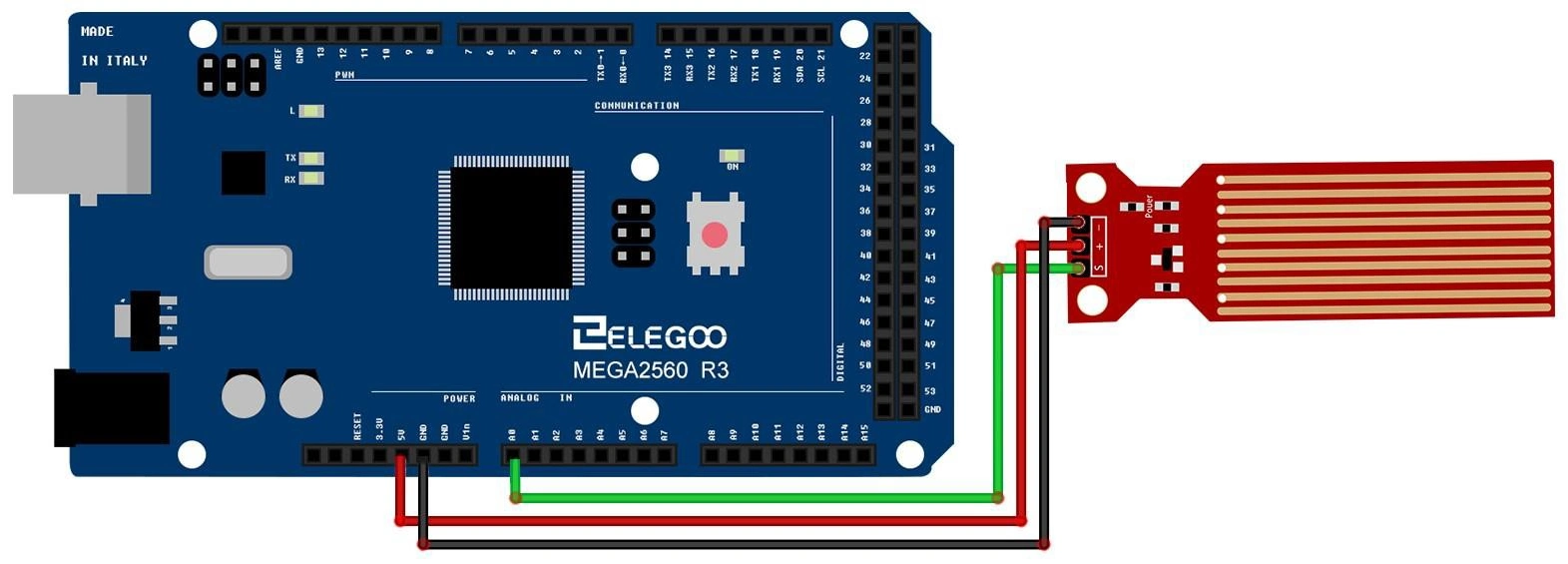
Source-reviewed wiring. Hardware not bench-tested; firmware uploads have not been performed.
Code
PlatformIO configuration
[env:mega]
platform = atmelavr@5.3.0
board = megaatmega2560
framework = arduino
monitor_speed = 9600
Open PlatformIO Monitor at 9600 baud after Upload. Close Monitor before another Upload if the port is busy.
// ELEGOO Lesson 18: conductivity changes an analog signal, not a calibrated depth.
#include <Arduino.h>
const uint8_t SENSOR_PIN = A0;  // A0 names the Mega's first analog input.
int previousPrintedValue = 0;
void setup() {
  Serial.begin(9600);  // USB serial messages use the same baud as PlatformIO Monitor.
}
void loop() {
  const int value = analogRead(SENSOR_PIN);  // A 10-bit reading is between 0 and 1023.
  // abs gives the size of a change in either direction. Exactly 10 does not print.
  if (abs(value - previousPrintedValue) > 10) {
    Serial.print("ADC0 level is ");
    Serial.println(value);  // println adds the newline previously produced by sprintf.
    previousPrintedValue = value;  // Compare against the last printed reading.
  }
}
Source: SOURCE_RECONCILED. Compile: COMPILE_VERIFIED. Hardware: NOT_TESTED. Upload: NOT_PERFORMED.
Expected behavior
Messages such as “ADC0 level is 320” appear when the reading differs by more than 10 from the last printed value. A steady/dry reading may produce no message; it is not calibrated water depth.
Experiments & Challenges
- Compare tap-water readings before and after changing the wetted area; keep the same water sample.
Troubleshooting
- No messages: change the wet contact enough to exceed ten counts, then check S→A0 and 9600 baud.