Site Guide

Find your way around the Engineering Club.

Know what you need? Search for a component, concept or project.

Around the site

Start

Labs

TestingExperimental

Build

Club

LearnExperimental

Go a little deeper

Entry points to larger collections. Use Search for individual records.

Learning paths & reference

Inside PiCrawlerExperimental

Inside Inventory

← Club inventory
Raspberry Pi 4 Model B 4GB

Microcontrollers

Raspberry Pi 4 Model B 4GB

Raspberry Pi 4 Model B 4GB is a Linux-capable single-board computer for software, networking and data processing alongside 3.3 V GPIO experiments.

Owned by clubQuantity: 1

Linux OS and filesystem · 3.3 V GPIO; hardware PWM via supported APIs · I²C; SPI; UART · USB; Ethernet; Wi-Fi; Bluetooth · micro-HDMI; camera/display connectors

What it does

Runs an operating system with processes, storage, networking and device drivers. It can log sensor data, host services or run robotics/computer-vision programs, while GPIO connects those programs to external circuitry. This is a full computer with gigabytes of RAM, not a microcontroller executing one sketch. Its versatility comes with boot time, storage maintenance, software configuration and higher supply demand. Pi 4 provides USB 3, Ethernet, wireless networking and dual display outputs in a compact platform.

Useful specifications

Processor
BCM2711 quad Cortex-A72; current reference 1.8 GHz, older configurations 1.5 GHz
Owned RAM
4 GB
GPIO header
40 pins including 3.3 V GPIO, power and ground
ADC
No general-purpose onboard header ADC
Ports
2 USB 3 + 2 USB 2; Gigabit Ethernet; 2 micro-HDMI
Wireless
Dual-band 802.11ac Wi-Fi; Bluetooth 5/BLE
Power recommendation
5 V / 3 A USB-C class
Storage
microSD; supported alternate boot storage
How it works

Broadcom BCM2711 contains four 64-bit Arm Cortex-A72 cores and integrated multimedia hardware. Boot firmware loads an OS from configured storage; Linux schedules processes and device drivers. GPIO writes become electrical signals through kernel-supported interfaces, while applications communicate with serial buses through enabled drivers.

Recognize the part

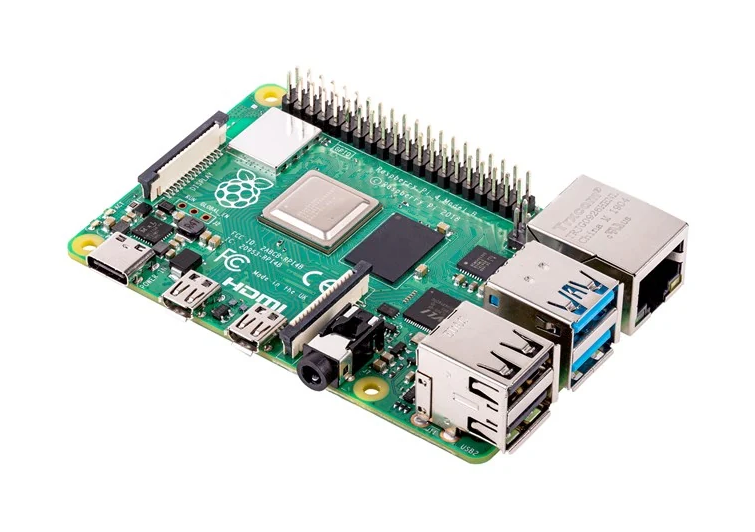
Raspberry Pi 4 board with Ethernet/USB, USB-C power, two micro-HDMI ports and a 40-pin header; the source holding identifies 4 GB memory. The 40-pin header includes power/ground as well as GPIO; connector position numbers are not BCM GPIO numbers.

Also called: Raspberry Pi 4, Pi 4 4GB

How to use it

Install a current supported Raspberry Pi OS image onto appropriate boot storage, connect the model-appropriate supply and configure networking/remote access. Use maintained GPIO libraries with support for this board; enable I²C/SPI/UART only as needed. GPIO signals are 3.3 V and not 5 V tolerant. There is no built-in general-purpose analog-input ADC on the header, so analog sensors need an external converter. Hardware PWM exists through appropriate peripherals/drivers, but ordinary user-space bit-banging has Linux scheduling jitter. Drive motors through external controllers/power and share signal ground. Shut down the OS before removing power or storage. Use a good model-appropriate 5 V/3 A supply or the verified CanaKit accessory, with cooling appropriate to workload. Firmware/board generation can affect the default CPU clock; do not infer the installed configuration from a current sales page.

Know before using

Limits

  • Power consumption, OS boot and storage complexity exceed microcontroller-class needs.
  • User-space timing is not hard real time.
  • No native analog input on the GPIO header.
  • Thermal throttling can reduce sustained performance.

Common mistakes

  • Connecting 5 V sensor outputs to GPIO.
  • Removing power while the filesystem is writing.
  • Assuming an arbitrary phone charger/cable provides reliable board power.
  • Treating header power pins as configurable digital outputs.

Care and safety

  • Use correct supply voltage and avoid header shorts.
  • Handle GPIO wiring with power removed; use drivers for inductive/high-current loads.

What you need with it

required

CanaKit 3.5 A USB-C Raspberry Pi 4 power supply

A reliable model-appropriate input supply is needed for normal computer operation.

  • Check observed undervoltage and peripheral current, not connector fit alone.
Owned type; verify quantity, rating and fit for this use.

optional

Micro-HDMI to HDMI cable

Local HDMI setup can be convenient; a configured headless SSH workflow does not require a monitor.

  • A compatible HDMI monitor/cable remains external; the adapter is not a GPIO display driver.
Owned type; verify quantity, rating and fit for this use.

What can I build?

intermediate · Optional enhancement

ESP32 low-voltage analog telemetry

Core electronics available

Publish a measured potentiometer setting and explicit timestamp over a local network.

Related owned hardware

Read the conditions before connecting parts. A relationship can involve a driver, controller or a redesigned circuit.

boot storage

SanDisk Ultra 32 GB microSDHC card

  • A compatible OS image on microSD can boot this Linux Pi.
  • The card supplies persistent OS/filesystem storage for the Pi.

Connection conditions

  • Use the correct board-compatible OS image; shut down before removal.

gpio breakout

Raspberry Pi GPIO expansion board

  • Expose the Pi header labels for low-current circuits on a compatible breakout.

Connection conditions

  • Use supported board GPIO software and 3.3 V signals; breakout does not add ADC or level shifting.

video output · support hardware

Micro-HDMI to HDMI cable

  • Micro-HDMI matches the Pi display output for setup or an instrument interface.
  • Local HDMI setup can be convenient; a configured headless SSH workflow does not require a monitor.

Connection conditions

  • An HDMI monitor and its compatible input remain external; this is not a GPIO display bus.
  • A compatible HDMI monitor/cable remains external; the adapter is not a GPIO display driver.

power

CanaKit 3.5 A USB-C Raspberry Pi 4 power supply

  • The source-established supply belongs to this board’s power setup.
  • This supply is the inventory-backed power candidate for the computer.

Connection conditions

  • Verify actual output profile, cable condition and model limits under peripheral load; not every USB-C supply provides Pi 5 full-current negotiation.
  • Check observed undervoltage and peripheral current, not connector fit alone.

thermal mechanical support

CanaKit Raspberry Pi 4 premium case

  • This model-specific accessory protects/supports or cools the Pi 4 setup.
  • The Pi 4 is the established mechanical target for this accessory.

Connection conditions

  • Check fit, thermal-pad insulation and fan voltage/polarity; it is not a Pi 5 fit guarantee.

thermal mechanical support

CanaKit Raspberry Pi 4 low-noise fan

  • This model-specific accessory protects/supports or cools the Pi 4 setup.
  • The Pi 4 is the established mechanical target for this accessory.

Connection conditions

  • Check fit, thermal-pad insulation and fan voltage/polarity; it is not a Pi 5 fit guarantee.

thermal mechanical support

Raspberry Pi 4 heat-sink set

  • This model-specific accessory protects/supports or cools the Pi 4 setup.
  • The Pi 4 is the established mechanical target for this accessory.

Connection conditions

  • Check fit, thermal-pad insulation and fan voltage/polarity; it is not a Pi 5 fit guarantee.

real time coprocessor

Raspberry Pi Pico

  • A Pico can handle deterministic timing while Linux handles logging, networking or analysis.

Connection conditions

  • Define a serial/USB protocol and safe grounding; host processes alone are not hard real time.

local display

2.42-inch SSD1309 128×64 OLED Display Module (I²C)

  • A supported Linux I²C driver can present compact status without an HDMI monitor.

Connection conditions

  • Check the carrier supply, address and pull-up rail. Use one compatible pull-up network for the bus and avoid pulling 3.3 V GPIO to 5 V.

robotics host

PiCrawler robot assembly

  • The Pi host can run revision-matched crawler software and coordinate motion.

Connection conditions

  • Identify controller/servo power revision, neutral positions and calibration first.
  • Use a supply matched to the actual load voltage and startup/stall current, with common signal ground. GPIO and breadboard signal wiring are not high-current power paths.

kit learning anchor

CanaKit Raspberry Pi 4 4GB Starter PRO Kit

  • The frozen kit contribution establishes this lesson component. Set up Linux/network logging while observing 3.3 V GPIO, power and storage prerequisites.

Connection conditions

  • Current web BOMs do not override the frozen source holding; check voltage/driver needs per component.

When would I use each?

Microcontrollers

Architecture choice for a host role; MCU and Linux SBC execution, power and analog/timing requirements differ.

Begin with required software/timing and signal voltage. Choose Uno for a small 5 V sketch, Mega for pin/UART count, ESP32 for embedded networking, and Pico for PIO-style timing. Pico 2 W adds networking to a newer MCU. Pi 4/5 are Linux computers; use an external ADC or MCU helper for analog inputs and deterministic timing. More CPU speed does not remove driver, power or voltage requirements.

Owned substitutions

Raspberry Pi 5 4GB

partial redesign

The owned alternative can perform the same broad host role when its capacity and required peripheral support are sufficient.

Required changes

  • Select the exact board target/OS and matching libraries.
  • Recheck physical pin mapping, power and timer/bus allocation.
  • Do not transfer compiled firmware blindly.
  • A smaller/no-radio alternative cannot preserve unavailable memory, pins, performance or wireless features.

If you outgrow it

Researched external products, separate from club inventory. Price and availability are not promised.

Raspberry Pi

Compute Module 5

Not owned by club

A custom embedded Linux product needs a modular carrier and potentially onboard eMMC instead of a general-purpose desktop board.

What improves

  • Enables carrier-based embedded integration and selectable eMMC-equipped configurations.
  • Uses the Pi 5-class BCM2712 platform in a modular form factor.

A custom embedded Linux product needs a modular carrier and potentially onboard eMMC instead of a general-purpose desktop board. Choose this path only when the stated improvement is a requirement.

Tradeoffs

  • Not a CPU-speed upgrade over Pi 5.
  • Carrier design, thermal management and variant-specific wireless/antenna compliance add work.

Additional hardware

  • Compatible CM5 carrier/I/O board, selected power and cooling arrangement, storage/antenna appropriate to the purchased variant
Migration steps
  • Review the exact product documentation and chosen carrier before purchase.
  • Rework connections, firmware/library configuration, power and mechanics as required by this path.
  • Validate the new subsystem against the project measurement or timing requirement.

Official product / documentation ↗

Texas Instruments

ADS1115

Not owned by club

A known low-rate ADC interface/gain/reference is needed; the generic owned ADC remains unidentified, so no performance superiority over that unknown device is claimed.

What improves

  • Adds an identified, documented low-rate external ADC with programmable gain and a reference.
  • 16-bit conversion up to 860 samples/s supports four multiplexed single-ended or two differential inputs.

A known low-rate ADC interface/gain/reference is needed; the generic owned ADC remains unidentified, so no performance superiority over that unknown device is claimed. Choose this path only when the stated improvement is a requirement.

Tradeoffs

  • This is not a fast audio/oscilloscope ADC.
  • Full-scale/PGA settings never permit a pin voltage above its supply/input absolute limits; bit depth alone does not establish system accuracy.

Additional hardware

  • ADS1115 carrier, I²C pull-ups at the host rail, input protection/filtering and a characterized analog source
Migration steps
  • Review the exact product documentation and chosen carrier before purchase.
  • Rework connections, firmware/library configuration, power and mechanics as required by this path.
  • Validate the new subsystem against the project measurement or timing requirement.

Official product / documentation ↗

Documentation

Keep learning

Learn the principle

Inventory record and image evidence

Quantity: 1 · quantity confidence: confirmed

Known countable purchase/BOM contributions. Each source line is a total; do not multiply by container count or add photo observations.

Ownership: source-backed club holding. Identity confidence: confirmed.

Supported by source contribution; unresolved variant and source details remain on its holding.

The owned 4 GB variants are frozen. Official platform values do not establish installed OS, firmware, current clock settings or measured power demand.

Source holdings

Parent kits

Original V3 image confidence: 95% · high. Official kit-maker Pi 4 board reference. The owned kit/purchase source establishes 4GB; this generic view alone does not.

Original V3 image source: CanaKit Raspberry Pi 4 product reference (manufacturer reference). Images describe identity and form; they do not establish quantity.

Displayed image source: CanaKit Raspberry Pi 4 product reference; user-approved V2 image cleanup.

User explicitly authorized integration of approved entries from the supplied V2 decisions export. Exact reviewed candidate bytes retained; original inventory identity, confidence and hardware facts remain unchanged.

Original reference image rights retained; cleanup does not change attribution or license.