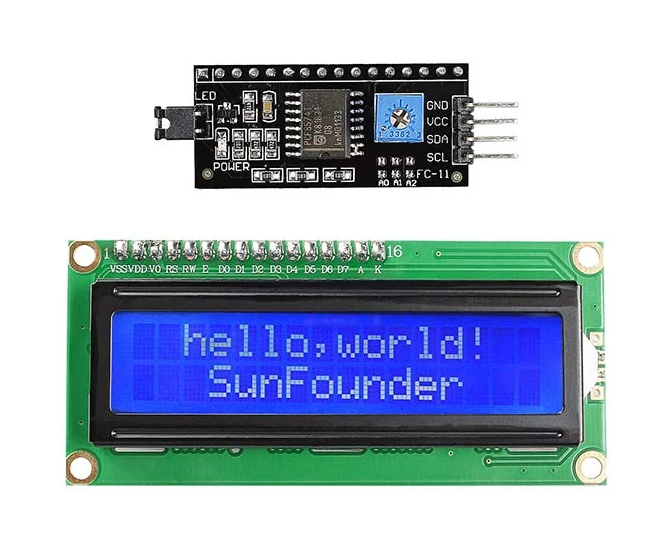
What it does
Shows readable text such as a measurement, menu or timer without maintaining a full graphics framebuffer. The character controller stores text and generates dot patterns. The rear backpack reduces host wiring to an I²C bus, but the expander-to-LCD mapping depends on the carrier.
Useful specifications
- Character layout
- 16 × 2
- Controller class
- HD44780-compatible character controller; verify actual module
- Module supply
- Typically 5 V; actual carrier limits must be checked
- Host interface
- I²C backpack, expander/address mapping unverified
How it works
Electric fields orient liquid-crystal molecules so polarizers change how much light reaches the viewer. A backlight supplies illumination; the LCD cells do not emit it. An HD44780-compatible controller typically selects character cells and dot patterns. An I²C GPIO expander reproduces the controller’s parallel signals; I²C does not replace the LCD’s internal character architecture.
Liquid-crystal layer between transparent electrodes/polarizers, with backlight and a controller PCB; the backpack is a separate interface adapter.
Recognize the part
Long rectangular 16×2 window and carrier PCB. Rear daughterboard with expander, contrast trimmer and a four-wire power/I²C header distinguishes this variant.
Also called: I2C 1602 LCD, LCD1602 with I2C backpack
How to use it
Identify the backpack IC/address and library pin mapping, scan the I²C bus, and inspect the pull-up rail before attaching 3.3 V logic. Verify module supply and logic thresholds, set the contrast pin/trimmer and confirm backlight limiting. Initialize 16 columns and 2 rows in a matching library. If blocks appear without text, check initialization, contrast and signal wiring rather than assuming a failed panel.
Know before using
Limits
- Only 32 visible character positions; small custom-character memory.
- Fixed character grid is not a general high-resolution display.
- Contrast and viewing angle affect legibility.
Common mistakes
- Assuming every backpack uses address 0x27 or the same mapping.
- Leaving a 5 V pull-up connected to 3.3 V GPIO.
- Confusing lit backlight with initialized LCD content.
Care and safety
- Check signal and pull-up voltage before low-voltage hosts.
What you need with it
required
The host supplies display-specific data, initialization and refresh/scan behavior.
- Check the carrier supply, address and pull-up rail. Use one compatible pull-up network for the bus and avoid pulling 3.3 V GPIO to 5 V.
- Identify expander address and library pin mapping.
Owned type; verify quantity, rating and fit for this use.What can I build?
intermediate
Core electronics availableShow DHT11 readings with last-valid age and checksum/error indicators on a 16×2 display.
intermediate
Core electronics availableUse relative encoder steps and a push input to navigate a stateful LCD menu.
intermediate
Core electronics availableCollect numeric entry on a Mega, display it and implement explicit accept/cancel states.
intermediate
Needs additional hardwareRead DS1307 time, accept a deliberate set command and report loss/uninitialized conditions.
beginner · Optional enhancement
Core electronics availableCount deliberate button presses once each and report the count over USB serial.
beginner · Optional enhancement
Core electronics availableRead an LDR divider and use separate on/off thresholds to avoid flicker near dusk.
beginner · Optional enhancement
Core electronics availableUse the Uno’s common 5 V environment to compare repeated range readings against measured target positions.
Related owned hardware
Read the conditions before connecting parts. A relationship can involve a driver, controller or a redesigned circuit.
local display
- 16×2 text is sufficient for temperature, relative humidity and a stale/error marker.
Connection conditions
- Check the carrier supply, address and pull-up rail. Use one compatible pull-up network for the bus and avoid pulling 3.3 V GPIO to 5 V.
- Route measurements through a controller; refresh no faster than valid sensor updates.
user interface
- A controller can echo entry, cursor state and validation messages on a compact text display.
Connection conditions
- Check the carrier supply, address and pull-up rail. Use one compatible pull-up network for the bus and avoid pulling 3.3 V GPIO to 5 V.
i2c display
- An I²C backpack saves host pins when only two lines of text are needed.
- LCD1602 16×2 Character Display with I²C Backpack supplies the output surface for a Arduino Uno R3 application.
Connection conditions
- Check the carrier supply, address and pull-up rail. Use one compatible pull-up network for the bus and avoid pulling 3.3 V GPIO to 5 V.
- Identify expander address and library pin mapping.
user interface
- A controller can use encoder turns/presses to change the displayed page or setting.
Connection conditions
- Input decoding and display communication are separate host tasks.
When would I use each?
Display choice for a task after information density, refresh, power and interface review.
Pick information density and refresh behavior first. Text does not require a framebuffer; a persistent e-paper label does not behave like a video screen. MAX7219 offloads scanning while bare matrices expose driver design. P5 offers a large color surface with materially greater power/timing demands. The four-digit carrier remains unsuitable for assumed driver-specific projects until identified.
Owned substitutions
partial redesignThe replacement can show an equivalent limited text/pattern task with a redesigned display layer.
Required changes
- Change wiring, display library/init, geometry and address/chain settings.
- Verify supply, pull-ups/logic thresholds and buffer/current budget.
- Character cells, pixel graphics and LED modules have different information density.
- This does not preserve framebuffer layout or exact refresh behavior.
If you outgrow it
Researched external products, separate from club inventory. Price and availability are not promised.
Adafruit
2.8-inch ILI9341 TFT with resistive touchscreen, product 1770
Not owned by clubA text or small monochrome display cannot present the desired color graphs and touch controls.
What improves
- Adds a 240×320 color graphics surface and resistive touch input for richer instrument controls.
- A supported SPI/parallel carrier provides a concrete color-UI path.
A text or small monochrome display cannot present the desired color graphs and touch controls. Choose this path only when the stated improvement is a requirement.
Tradeoffs
- Backlight power, graphics transfer time and framebuffer memory matter.
- More pixels do not guarantee fast animation on a small MCU; display and touch require their own software configuration.
Additional hardware
- Compatible connectors/logic/power, supported display/touch drivers and enclosure; sufficient MCU memory or partial redraw strategy
Migration steps
- Review the exact product documentation and chosen carrier before purchase.
- Rework connections, firmware/library configuration, power and mechanics as required by this path.
- Validate the new subsystem against the project measurement or timing requirement.
Official product / documentation ↗
Wishlist / acquisition context
LCD1602 with I2C backpack: 1 individual units · received
View wishlist →Inventory record and image evidence
Quantity: 1 · quantity confidence: confirmed
Known countable purchase/BOM contributions. Each source line is a total; do not multiply by container count or add photo observations.
Ownership: source-backed club holding. Identity confidence: confirmed.
Supported by source contribution; unresolved variant and source details remain on its holding.
V1 establishes the catalog identity. Technical references explain the named device or component class; unverified carrier-specific ratings and pinouts are not asserted.
Source holdings
Original V3 image confidence: 75% · probable. Manufacturer reference visibly includes LCD1602 and a separate I2C backpack; matches the owned product class, not a confirmed seller/color/revision.
Original V3 image source: https://www.sunfounder.com/products/i2c-lcd1602-module (manufacturer reference). Images describe identity and form; they do not establish quantity.
Displayed image source: https://www.sunfounder.com/products/i2c-lcd1602-module; user-approved V2 image cleanup.
User explicitly authorized integration of approved entries from the supplied V2 decisions export. Exact reviewed candidate bytes retained; original inventory identity, confidence and hardware facts remain unchanged.
Original reference image rights retained; cleanup does not change attribution or license.